SeeKick
Who it's for Product Tools AI How it works Accuracy Pricing FAQ
Get three matches freeContact

Football match analysis

Upload a match. By the evening after, you have every player's running, touches and clips, and a written match report, with names from shirt numbers.

Free pilot for clubs: three matches, no card, no contract. Then £99 a month for up to five matches.

Your video Analysed by SeeKick

0:00

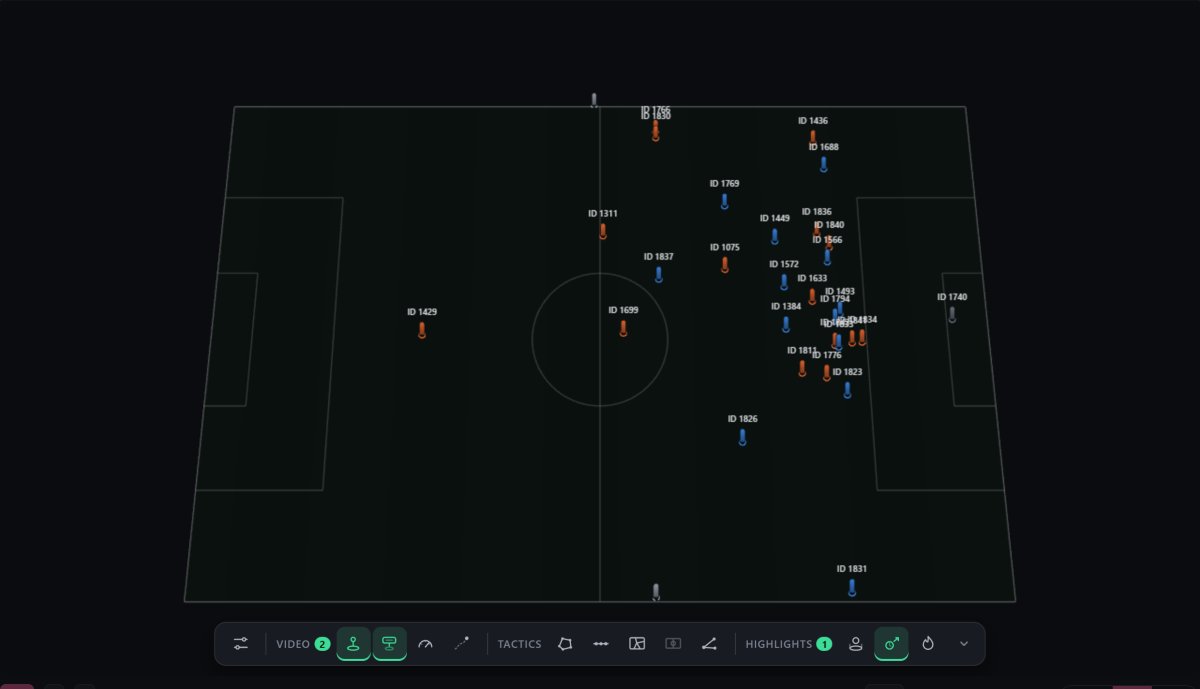
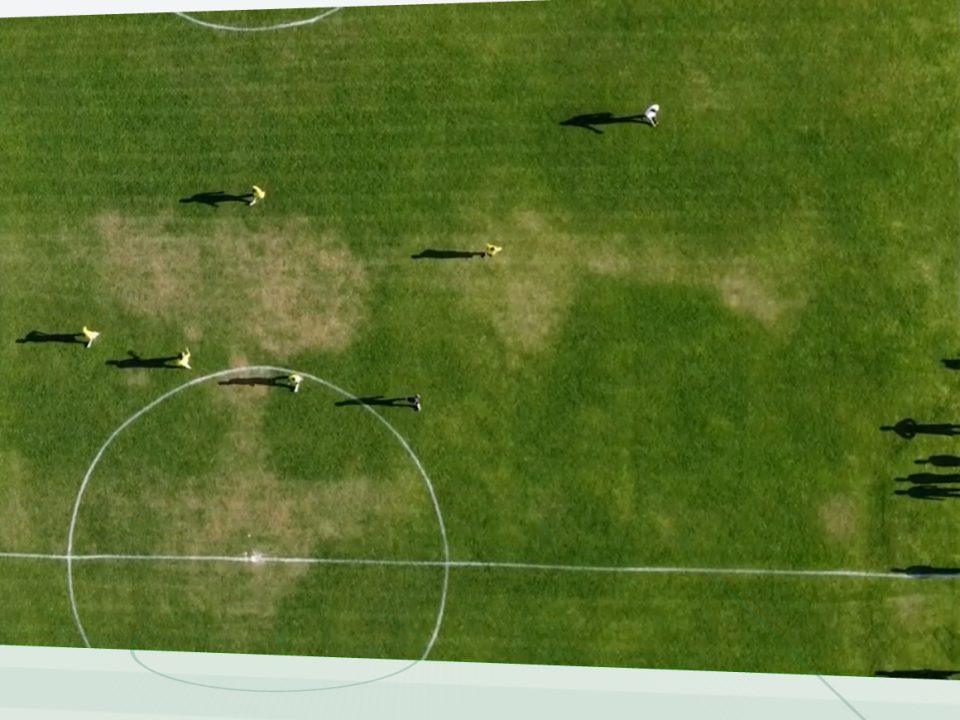
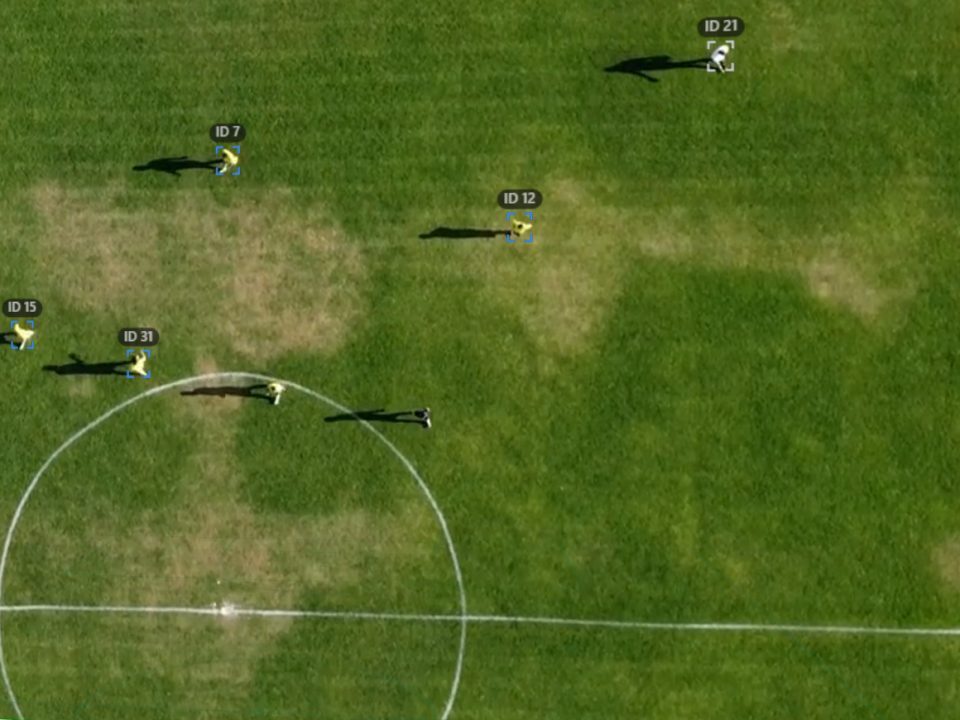
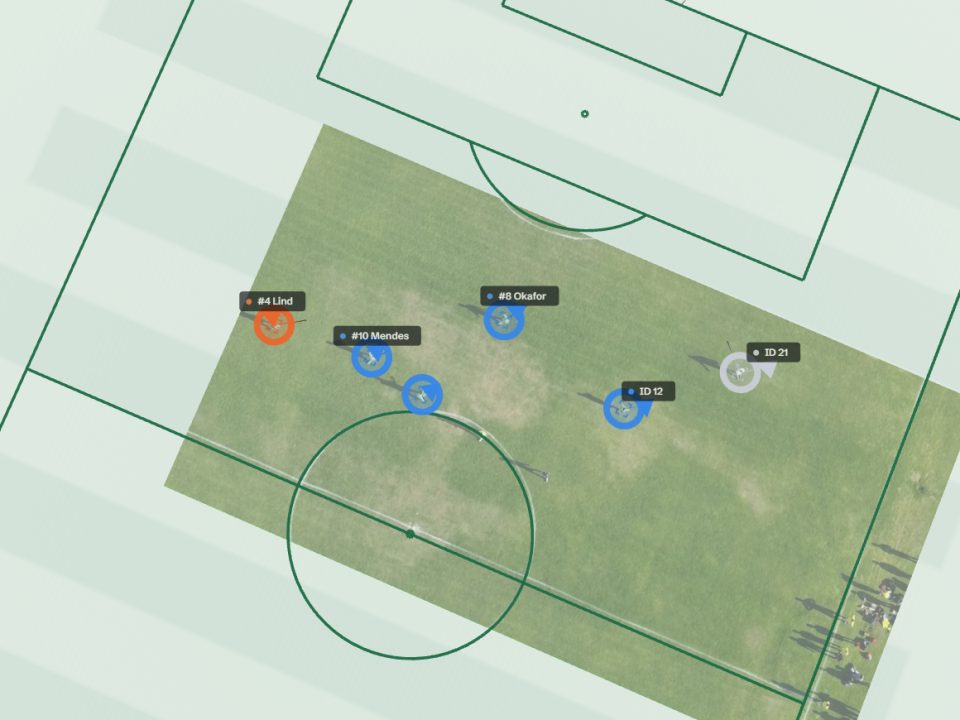
Fig. 1. Real tracking, not a mock-up: 16 seconds of a SoccerTrack v2 match (CC BY 4.0) as SeeKick analysed it. Every marker and radar dot is the app's own output for those frames. The names are samples: no team sheet was given for this match. Drag the line to compare.
  • Both teams

    The opponent is measured from the same video, player by player.

  • No hardware

    No vests, no sensors, no new camera. One video, 1080p or better.

  • Evening after

    Upload after the final whistle; the analysis is ready by the evening after.

  • Your tools

    A Sportscode XML timeline, CSV files of the events and the tracking data.

01Who it's for

Built for everyone around the team

One account per club, where each person gets a role and sees the tools they need, from the head coach to the club's media team. Freelance analysts, leagues, referees and schools have their own way in.

  • Coaches

    The match, measured, before Monday's training: both teams' running and the moments that decided it.

    Match report · player cards · key moments

  • Analysts

    Every player tracked for you, so the hours go into analysis: draw, clip and code on top of it.

    Drawing tools · Studio · Sportscode XML

  • Opposition analysts

    The next opponent's last match, measured: their shape, their line, their fastest players.

    Team shape · defensive line · reels

  • Recruiters & scouts

    Every player on the pitch, not only your own, from footage you already receive.

    Player cards · reels across matches · view-only links

  • Fitness & sports science

    Running loads without vests: distance, high-speed running, sprints and accelerations, with men's and women's speed bands.

    Physical data · player cards · both teams

  • Players & agents

    A one-match card with the numbers, a heat map and a reel, to keep or to send.

    Card as PDF · heat map · reel

  • Club media

    Clips cut for social media in a few clicks, with captions and the club's logo.

    16:9 · 9:16 · 1:1 reels

  • Clubs & academies

    One private server for the whole staff, built for youth football: you decide what is shared, and it is deleted when you ask.

    Accounts and roles · private server

  • Freelance analysts

    One private account for each club you work for, each with that club's logo, and the same tools in every one.

    An account per club · club branding · Sportscode XML

  • Leagues & county FAs

    Every club in a division on one deal, with the same data from each match and a referee report on top.

    League deals · every club · referee reports

  • Referees

    The referee's running and his distance to the ball, measured from the same match video.

    Distance · sprints · distance to the ball · heat map

  • Education & research

    Real matches as teaching material for coach courses, schools and universities, with the tracking data to study.

    Viewer · tracking export · teaching use

02Product

One upload. Everything you analyse after a match.

The same outputs whichever side you are on: both teams are measured from the one video. Nothing to wear, nothing to install.

Viewer

The match, with everything drawn on it

Play the match with every player, both teams, the referee and the ball tracked on the picture, and the same moment on a radar in real metres.

  • Players followed frame by frame, coloured by team
  • A radar and a 3D pitch you can turn and fly around
  • Drawing tools that stay on the grass when the camera moves
  • An offside check that says "too close to call" when it is
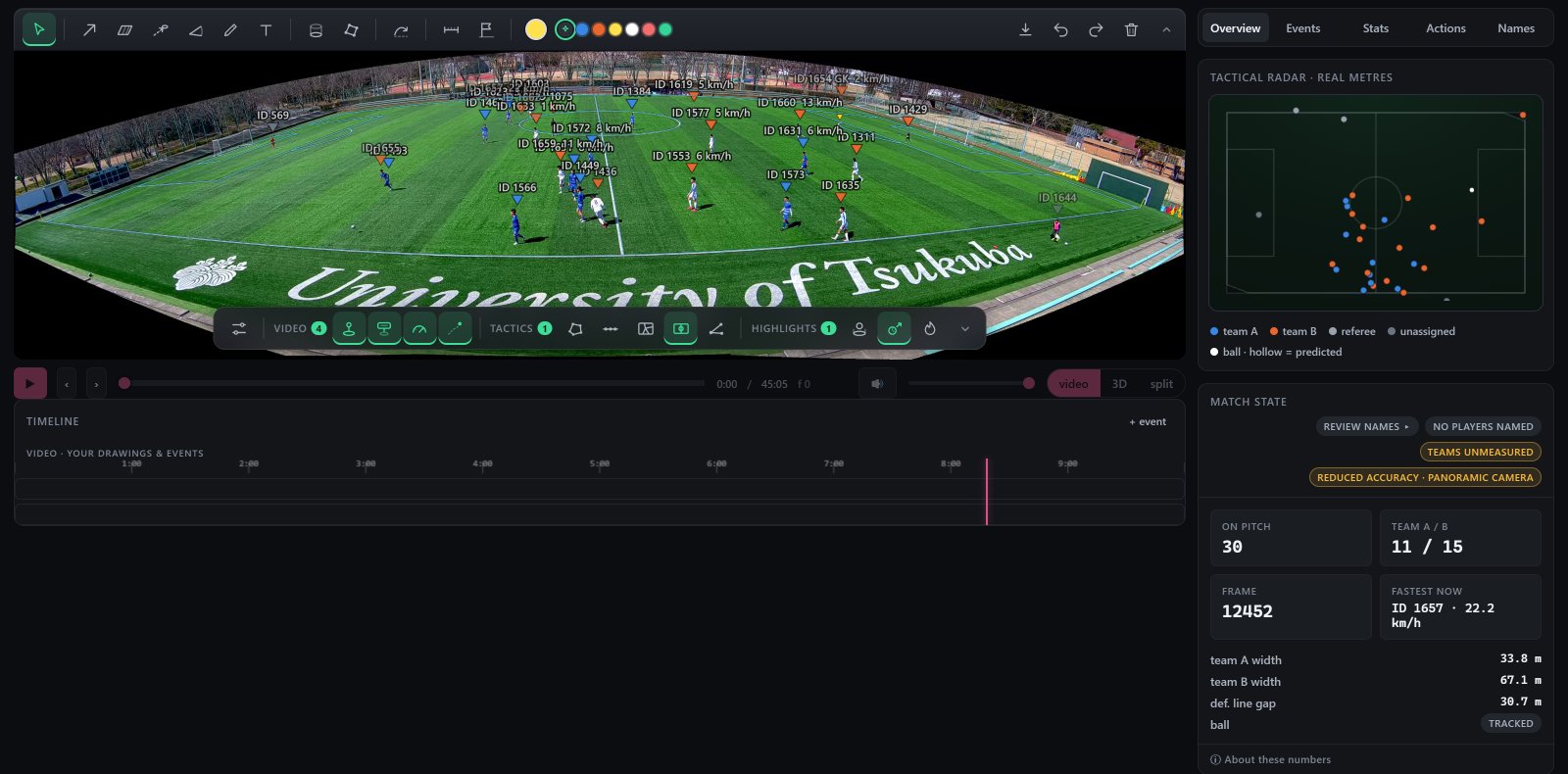
The SeeKick viewer: a match with every player boxed and labelled, a timeline under it, a radar in metres and the team shape numbers beside it
The same moment on the 3D pitch, every player placed in metres
The radar: both teams' players as dots on a pitch drawn in metres
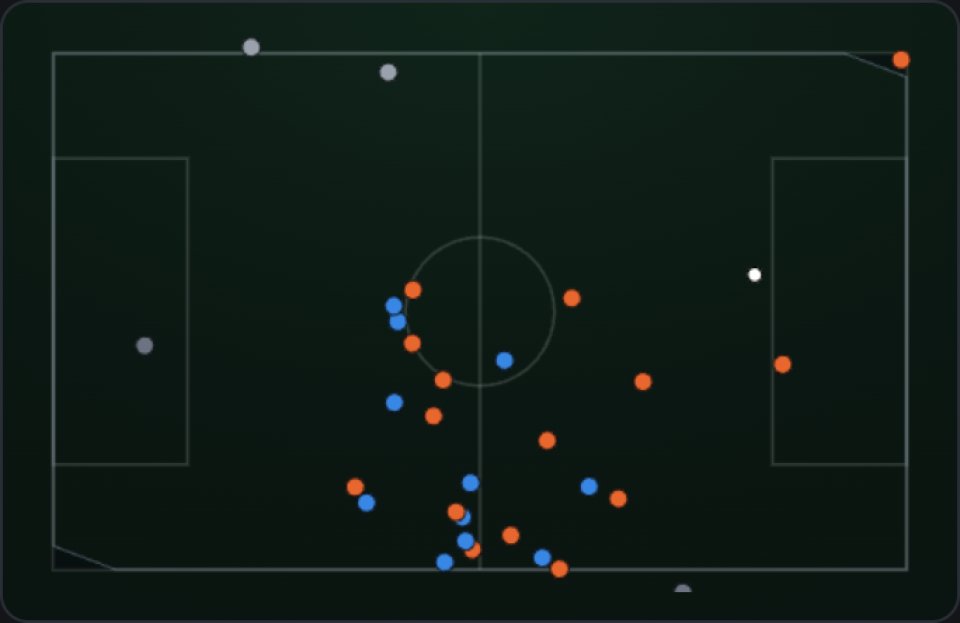
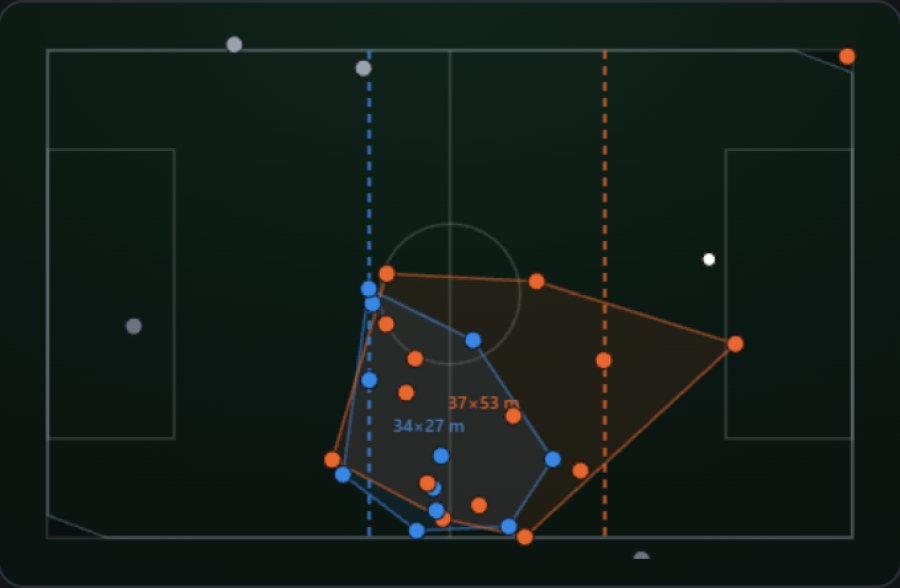
Fig. 2. The viewer on the same SoccerTrack match: 30 players tracked, each team's width and the gap to the defensive line. Below: the same moment on the 3D pitch and on the radar, both in real metres.

Names

Names from shirt numbers, for both teams

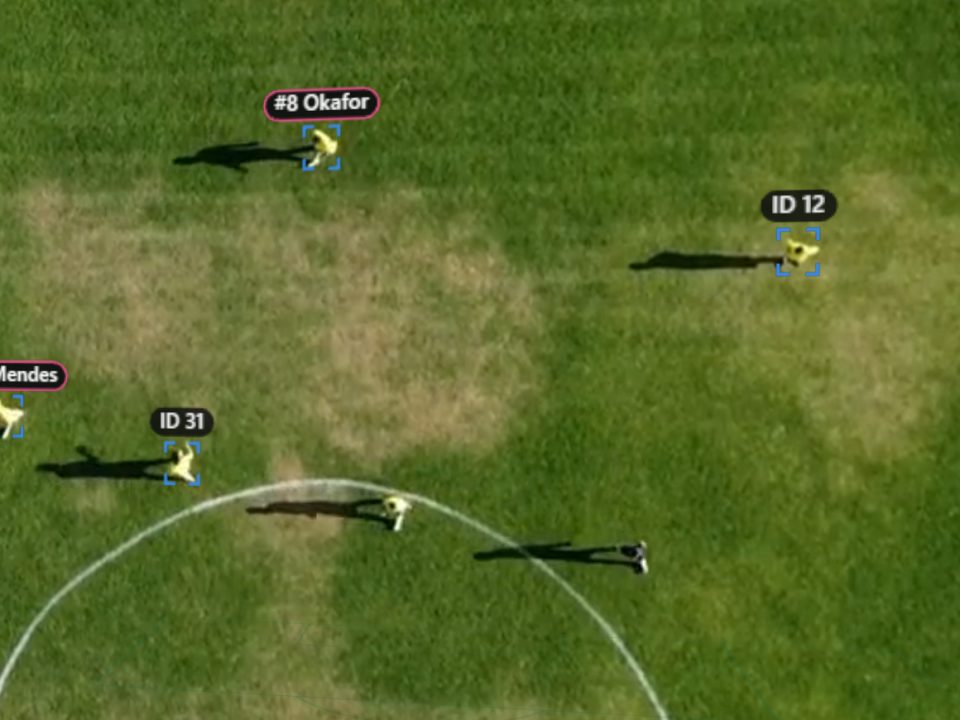
SeeKick reads the shirt numbers and matches them to the team sheets. A player it cannot place stays an ID until you name him in one click, and the name then follows him through the match.

  • Team sheets found with the fixture, or pasted from the clubs' own
  • Every machine name can be checked, corrected or taken off, and undone
  • A person's decision always wins over the machine's
  • Players are recognised by shirt numbers, never by face or build

1 · Read

8

The number on the back, read across the clips where it shows.

2 · Match

7 J. Ferris
8 M. Okafor
9 T. Lind

Matched to that team's sheet, and refused if the player is not on the pitch.

3 · Show

#8 Okafor

On the video, the radar, the report and the clips.

Fig. 3. How a name gets onto a player. Sample names.

Physical data

Running data for every player on both teams

Distance, high-speed running, sprints and accelerations while each player is on camera, with the top speed of every sprint. Each figure carries the share of the match the player was on camera, and running numbers are marked provisional.

One set of definitions is used everywhere: on the player card, in the report and the referee report. Women's matches use women's speed bands, set per match.

The figures have been checked for plausibility against SkillCorner's open tracking data, through the same definitions: on broadcast footage they come out in the same range.

Definitions of the physical metrics
MetricDefinition
DistanceMetres covered while on camera
High-speed running19.8 km/h and above; women 19.0
Sprint25.2 km/h and above, for at least 1 s; women 23.0
Acceleration±3 m/s², held over 1 s
Top speedFastest half-second average; anything above 37 km/h is refused, never clipped
RatesPer minute measured on camera, so players seen for different times compare fairly
Fig. 4. The physical definitions. Where the tracker is not sure of a speed, it leaves it blank rather than guessing.

The next opponent

Their last match, measured before you play them

Upload a video of the opponent's last match and you get the same data on their players as on yours. A GPS vest only ever measures your own squad; video measures both.

  • Their shape and their defensive line, in metres, at every moment
  • Their fastest players, with top speeds and sprints
  • A reel of any player, or of every sprint, for the team talk
What a video of the opponent's last match gives you
QuestionFrom their last match
How wide and deep do they play?Each team's width and depth, live on the radar
How high is their line?The defensive line and the gap to it, in metres
Who is quick?Top speed, sprints and high-speed running per player
Where do they lose the ball?Turnovers on the pitch, provisional
Who links their play?A pass network for each team, provisional
Fig. 5. What a video of the opponent's last match gives you. Formations and pressing are not offered: see Accuracy.

Match report

A written report, with every number checked

An AI model (Anthropic's Claude) writes the words: key moments, the team comparison, the pass network, heat maps. Before you see it, every number in it is checked against the match data, and a sentence whose number the data does not contain is removed.

Ask the match a question in plain words. The answer is held to the same rule, and it can play you the clips it is talking about.

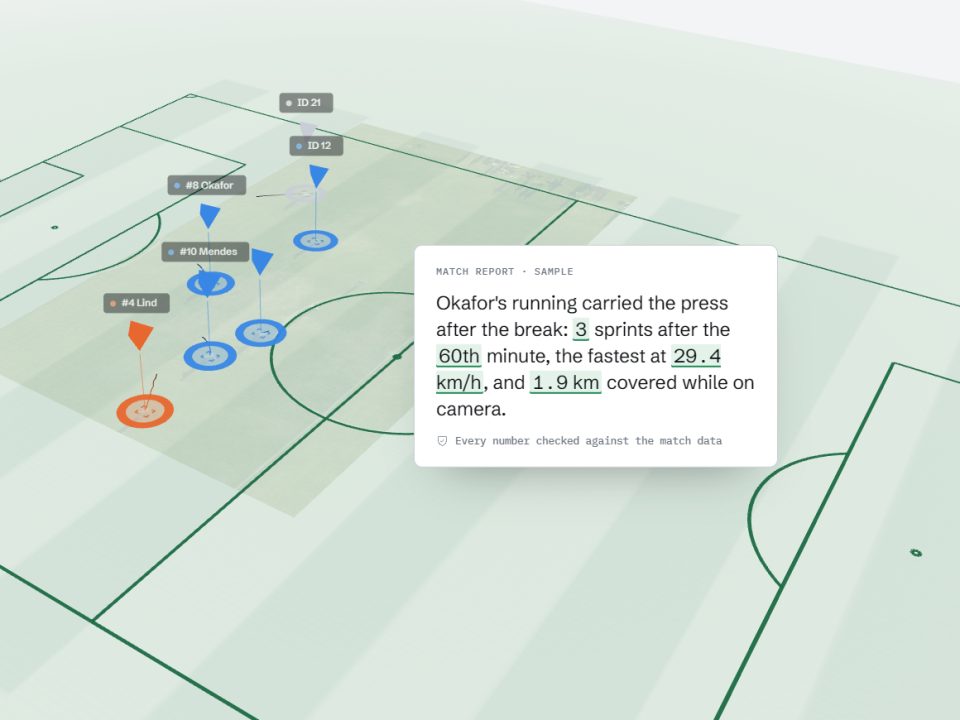
Match report · second half

The press held after the break. Okafor made 3 sprints after the 60th minute, the fastest at 29.4 km/h, and covered 1.9 km while on camera.

4 numbers, 4 found in the match data

Fig. 6. A sample paragraph. Highlighted: each number the check found in the data.

Export and share

Your tools, not ours

Every match exports as a Sportscode XML timeline, a CSV file of the events and the tracking data, so the work goes into the tools you already use. Player cards and the referee report print to PDF. A match can be shared with a view-only link that you switch off whenever you like.

  • Every exported event says where it came from, and whether a person confirmed the name
  • A referee report for every match: distance, sprints and distance to the ball
  • Reels as MP4 in 16:9, 9:16 or 1:1
<instance>
  <ID>4</ID>
  <start>94.880</start>
  <end>98.680</end>
  <code>Rossi</code>
  <label>
    <group>Source</group>
    <text>Automatic (CV) - provisional</text>
  </label>
  <label>
    <group>Name source</group>
    <text>confirmed by a person</text>
  </label>
  <label>
    <group>Touches</group>
    <text>1</text>
  </label>
</instance>
Fig. 7. One instance from the sample export below, shortened: a touch, where it came from, and who confirmed the name. Sample name.

Sample files

See the real output

These files were made by the app itself, from the 10-minute SoccerTrack v2 research clip used on this page. It was filmed with one fixed panoramic camera and came with no team sheet, so the names are samples, each named player is followed for one to two minutes, and the tracker credited few touches and no passes.

The measured results on this page come from matches filmed by a manned camera, the kind most clubs already use.

Sample files to download
FileWhat it shows
Match report
PDF · 1.0 MB
The written report: takeaways, the team comparison, heat maps and each named player's numbers
Player card
PDF · 140 KB
One player's distance, top speed and heat map, with the minutes he was measured
Sportscode XML
XML · 5 KB
The events as a Sportscode timeline, each with its source and who confirmed the name
Events CSV
CSV · 1 KB
The same events as a spreadsheet
Fig. 8. Sample files from the app, on the SoccerTrack v2 research match (CC BY 4.0). Sample names.

03Analysis tools

The tools an analyst works in

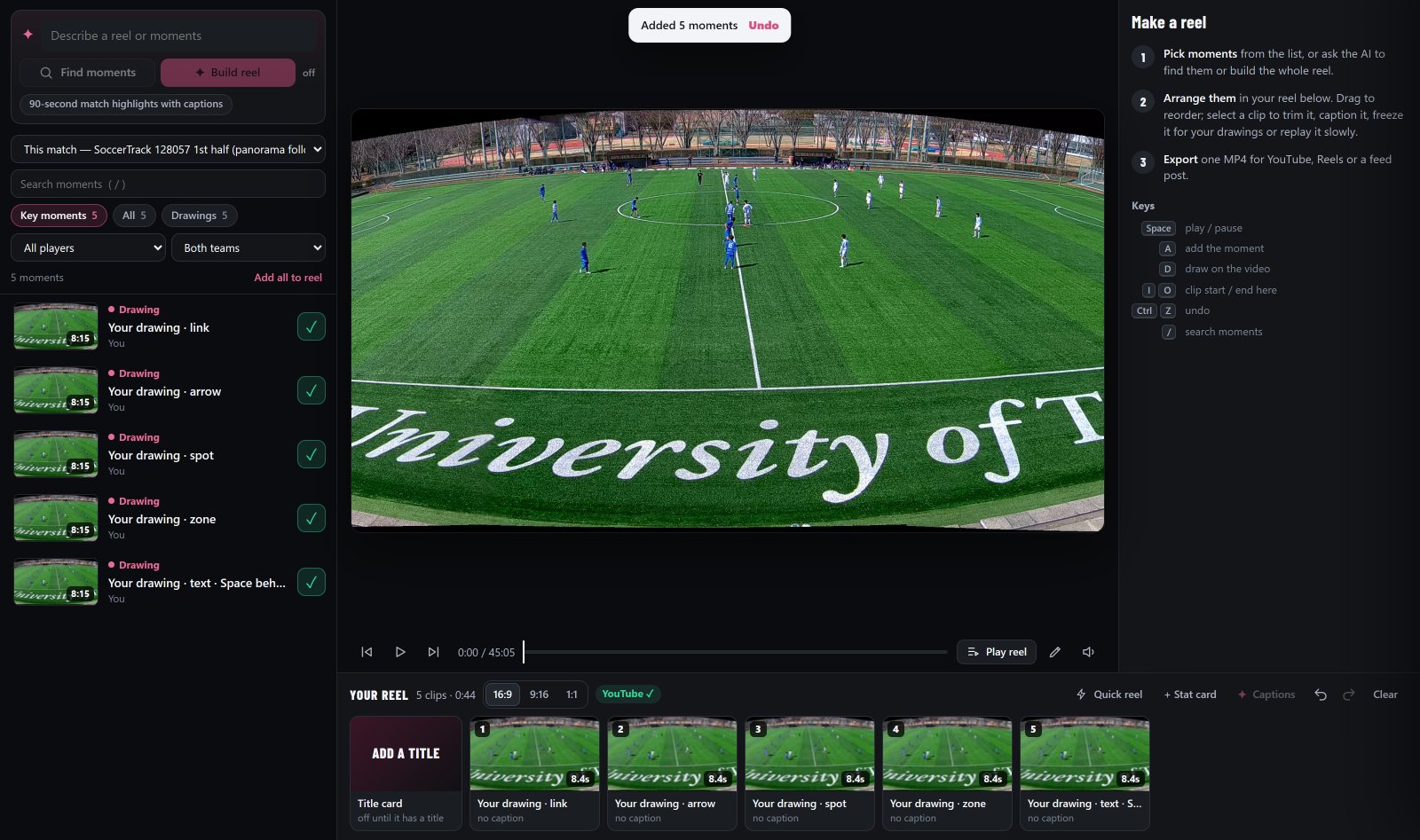
Everything happens on the real match: draw on it, switch on the tactical layers, turn it in 3D and cut it into reels.

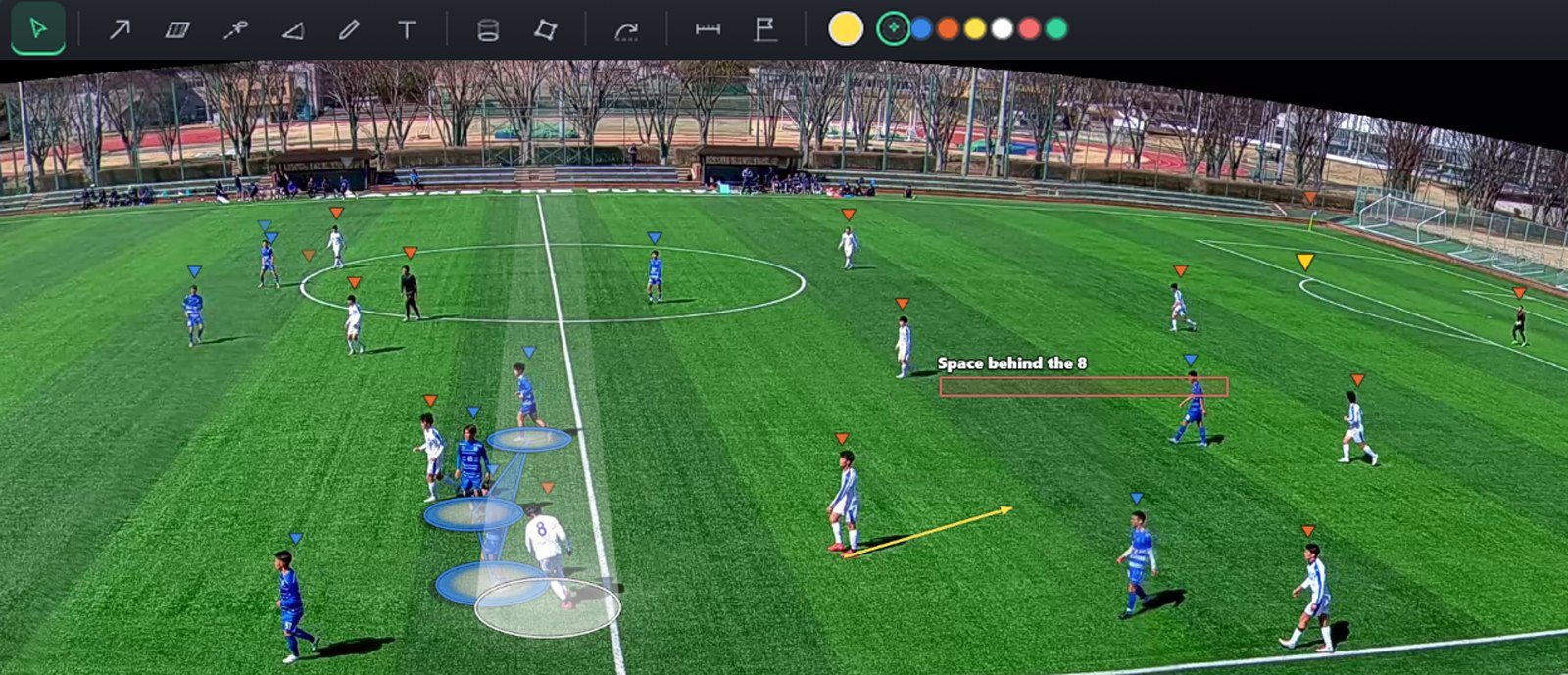
The viewer's drawing tools above a match with drawings on it: an arrow into space, a spotlight on one player, three linked players and a labelled area
Fig. 9. Drawings on the SoccerTrack match: an arrow, a spotlight, a link between three players and a labelled area, under the app's own tool strip.

Draw on the match

Arrows, areas, player links, spotlights, text, 3D passes and a measuring tape. Drawings stay on the grass when the camera moves, follow the player they are attached to, and go straight into a reel.

  • Saved with the match, for the whole staff
  • An offside check with an error band
  • Undo, redo and keyboard shortcuts

04AI

AI that shows its working

AI does the reading and the writing. Every number it gives you is checked against the match data first, and anything it cannot back up is left out.

  • Reads shirt numbers

    An AI model reads the number on every clip where it shows. A name is only written when the number matches one player on that team's sheet, and he is on the pitch at that moment.

  • Writes the match report

    Key moments, the team comparison and a note on each player, in plain words. A sentence whose number is not in the data is removed before you see it.

  • Answers questions about the match

    Ask in your own words. The answer is held to the same rule, and it comes with the clips it is talking about.

  • Builds a reel from a sentence

    "Every sprint by #8 in the second half." The Studio finds the moments and cuts the reel; you check it and export.

Ask the match

Sample

Fig. 13. A sample conversation with sample names and numbers. In the app, the answer comes from your match's data, and each number in it is checked before it is shown.

05How it works

From footage to data, in five steps

From the video to the data, in five steps. An illustration on stock footage with simulated tracks; the real output is Fig. 1 at the top of the page.

  1. A match video standing on a 3D pitch, the pitch lines drawn in front of it

    1

    The footage you already have

    One camera, 1080p or better, filmed high up near the halfway line. It is checked before anything runs.

  2. The match video with every player boxed and given an ID

    2

    Every player found and followed

    Both teams and the referee, frame by frame. Cuts, replays and close-ups are recognised and left out.

  3. A closer look: three players' IDs have become names

    3

    Named from shirt numbers

    Numbers are read and matched to the team sheet. Where the evidence is too weak, a player stays an ID until you name him. Sample names.

  4. The video laid flat on the pitch, the players now markers placed in metres

    4

    Placed on the pitch, in metres

    The picture is mapped onto the pitch's own lines, so every player has a position, a speed and a distance.

  5. The players as markers on the 3D pitch, with a sample sentence of the match report beside them

    5

    Explained in words

    The report is written from the data, and every number in it is checked before you see it.

06Match day

A match, start to finish

You keep filming the way you do now. The rest happens without you, and you are told at every step what is going on.

  1. Before kick-off

    Set up the camera

    High up, level with the halfway line, the sun behind you. Film the whole match, kick-offs included.

  2. After the final whistle

    Upload the video

    MP4, MOV or WEBM up to 16 GB, from your club's library page. The upload pauses and resumes.

  3. Minutes later

    The footage is checked

    Before anything runs. If the video cannot give good results, you are told why, before you wait for nothing.

  4. Overnight

    The match is analysed

    Players, teams, positions on the pitch, shirt numbers and names, physical data, clips and the report.

  5. The evening after

    Open, check, share

    Check the names in a few clicks, then send the report, the player cards and the reels to whoever needs them.

07Where it fits

Next to what clubs already use

SeeKick does not replace a GPS vest or an analyst. It gives you both teams, from video alone, without the hours.

SeeKick compared with GPS vests and manual tagging
QuestionSeeKickGPS vestsManual tagging
Who is measuredBoth teams, every player on cameraYour own players, wearing a vestWhatever the analyst tags
What you needThe video you already filmA vest and a pod per playerAn analyst's time
Running dataFrom video; positions within about 1-2 mThe most precise, for your own squadNone
Events and clipsTouches, sprints and reels, found automatically, checkableNonePrecise, by hand
NamesFrom shirt numbers and the team sheetEach vest is a playerTyped by hand
Time per matchUnattended; ready by the evening afterDownload after the sessionHours

Fair to say: for centimetre-level load data on your own squad, a vest is still the better tool. For the opponent, and for clubs without vests, video is the only source there is.

Already on Wyscout or Hudl? Keep them. SeeKick adds both teams' physical data from your own footage, and exports a Sportscode XML timeline.

08Accuracy

How sure we are, in numbers

We measure our own accuracy and print it. When a number is not good enough to show, we do not show it.

34-58%

of on-screen player time named

Names come from shirt numbers matched to your team sheet. On broadcast-style 1080p footage we have named 34 to 58% of the time players are on screen. The rest stays unnamed rather than guessed, and you can name any player with one click.

1-2 m

typical position error

Player positions are typically within about one to two metres, so distances, speeds and zones carry that error. Running numbers are marked provisional.

56%Not shown

possession, as measured

Possession measured 56% accurate on our labelled sample, which is no better than a guess, so we leave it out. Touches, passes and turnovers are still counted.

What is shown, and how
OutputHow it is shownWhy
Players, teams and the ballShownTracked frame by frame; cuts and replays are left out rather than followed.
NamesShownOnly where the shirt number and the team sheet agree; you can check every one.
Distance, sprints, top speedProvisionalCarries the 1-2 m position error; a speed the tracker is unsure of stays blank. Checked for plausibility against SkillCorner's open data, not against vests.
Turnovers and the pass networkProvisionalChecked by eye on one match so far, not yet scored against labels.
Wide fixed camerasReduced accuracyRunning data works; shirt numbers rarely read, so most names come from you.
Possession %Not shown56% on our labelled sample: no better than a guess.
xG, pass accuracy, formations, tackles, pressingNot offeredVideo alone cannot measure these well enough yet.

09Privacy

Your footage stays yours

Clubs film children, staff and opponents. The service is built for that from the start.

  • A private server per club

    Hosted in the EU, behind a sign-in. No club can reach another club's matches.

  • Accounts and roles

    Each person gets the role they need; you decide who can upload, export or share.

  • Links you can switch off

    Share one match with a view-only link, and switch it off whenever you like.

  • Never trained on

    We never train models on your footage, and never sell it or advertise with it.

  • Export and delete

    Everything exports. A match, or the whole account, is deleted when you ask.

  • Numbers, not faces

    Players are recognised by shirt numbers and your team sheet, never by face or build.

  • Youth teams

    The club is the controller and holds the consent it needs, parents' included. We process the footage only on its instructions.

  • Kept until you delete it

    No automatic deletion and no hour limits. Backups are the newest 14 nightly copies.

  • Who else handles it

    EU servers, EU GPUs and Anthropic's AI service for the written report, among others. Every one is named in the notice.

Every company involved is listed in the privacy notice.

10Pricing

Start with three matches, free

No card and no contract during the pilot. From December, £99 a month for up to five matches, both teams included.

Pilot · open now

Free

Three matches for your club, with every feature, and a private account set up for you.

  • Both teams analysed, every player on camera
  • Names, running data, reels and the written report
  • Sportscode XML, CSV and the tracking data
  • 15 minutes of your feedback after each match

How it starts

  1. Send a link to one recent full match and both team sheets
  2. We run the footage check and tell you what to expect
  3. Your first match is ready by the evening after
Get three matches free

Season · from December

£99 a month

Up to five matches a month, both teams. Or £790 for the rest of the season, paid up front. Clubs from the pilot get 50% off for their first six months.

  • No limit on hours of footage
  • No camera to buy
  • Accounts for the whole staff
  • Everything exports; nothing is deleted unless you ask
  • Cancel by email
Ask about pricing

Player pack · from January

For players, parents and agents

A player's card, heat map and reel from a match, to keep or to send to a club. Until then, a club can share any match with a view-only link.

  • The numbers, a heat map and a reel of his touches and sprints
  • Card as PDF, reel as MP4
Join the list

Leagues, referees & events

One deal for many matches

Every club in a division on one deal, a referee report for every match, or a tournament's matches with reels for the teams.

  • The same data for every club
  • Referee reports: distance, sprints, distance to the ball
Talk to us

11Recently shipped

What changed this month

The product ships every week. A few of the things that went out in October 2026.

  1. Light and dark themes across the whole app, and a calmer viewer on phones.

  2. Drawing tools, rebuilt: grouped tools, presets for the layers, and "add to reel" from any drawing.

  3. Unidentified players: every unnamed clip in one list, with a shortlist of who it can be.

  4. The naming page: name automatically, check every clip of a player, undo anything.

  5. Clubs' own team sheets for games that are on no data site.

  6. The offside check: both lines through the camera, with an error band and "too close to call".

  7. The Studio: from moments to a reel in 16:9, 9:16 and 1:1.

  8. Player cards and PDF, a referee report, view-only links and club branding.

12FAQ

Questions

Something else? Write to us.

What footage works?

A full match or a half, 1080p or better, from one camera. A manned camera that follows the play, filmed from high up near the halfway line, gives the best results, and 4K reads shirt numbers most reliably. Wide fixed cameras are accepted with a "reduced accuracy" label. Footage from behind a goal, and stitched panoramas, do not work yet.

Can we try our own footage first?

Yes. Send a link to one recent full match. We run the same footage check the app runs before every analysis, and tell you what to expect from it before anything else happens.

What does it cost after the pilot?

£99 a month for up to five matches, both teams included, or £790 for the rest of the season paid up front. Clubs from the pilot get 50% off for their first six months. No hour limits, nothing to buy, and you cancel by email.

Do we need a special camera?

No. Most clubs already film with something good enough. What matters more than the brand is where it stands: high up, level with the halfway line, following the play, with the sun behind it.

Can we use footage from a wide automatic camera?

Yes. It is analysed with a "reduced accuracy" label: tracking, positions and running data work, but shirt numbers rarely read, so most names come from you and the team sheet. It also takes about twice as long.

Our league is not on any data site. Does that matter?

No. Paste both team sheets (number and name) and pick each team's shirt colour, and the names come from those.

Is it right for women's football?

Yes. Set the match as a women's match and the physical data uses women's speed bands: high-speed running from 19.0 km/h and sprints from 23.0 km/h. The player cards, the report and the referee report use them; the viewer's live stats table still uses the men's bands, and says so.

How do we know a name is right?

Every name the machine sets can be checked from the player's page, with a picture from each of his clips. You can confirm, correct or take a name off, for one clip or all of them, and undo it. A name you set is never changed by the machine.

Who can see our matches?

Only people you give an account to. Each club has its own server and sign-in. A match can be shared with a view-only link that you can switch off at any time.

Where is the data processed?

Your club's server is in the EU. Player detection and shirt-number reading run on rented GPUs in an EU data centre. The written report and some shirt-number checks use Anthropic's AI service. The privacy notice lists every company involved.

How long does it take?

We promise the evening after you upload. It depends on the match length and the queue; the library shows each step's progress, and you can close the page while it runs.

Can we get the analysis faster?

The analysis itself has run in about half an hour on rented GPUs. Names, the written report and our own checks follow, so the promise is the evening after. We will publish the measured time once we have it from real matches.

Can we take the data into Sportscode or a spreadsheet?

Yes. Every match exports a Sportscode XML timeline, a CSV file of the events and the tracking data. The sample files above show exactly what you get.

We already use Wyscout, Hudl or GPS vests. Do we need this?

Keep them. SeeKick measures both teams from your own video, which vests cannot, and its Sportscode XML puts the events into the tools you already use. For your own squad's load data, a vest stays the more precise tool.

Do players need to be told?

The club decides what is filmed and shared, and is responsible for players' and parents' consent, especially for youth teams. We process the footage on the club's behalf and delete it when asked.

Can a player, parent or agent use it?

A player pack, with a player's card, heat map and reel from a match, comes in January; join the list from the pricing section. Until then the footage belongs to the club: ask the club to share the match with a view-only link.

I work for several clubs as a freelance analyst.

Each club gets its own private account with its own logo, so you work in all of them with the same tools. Write to us and we set them up.

Do you work with leagues, referees or tournaments?

Yes: one deal for every club in a division, a referee report for every match, or a tournament's matches with reels for the teams. Write to us.

Schools, coach courses and research?

Matches work as teaching material in the viewer and on the 3D pitch, and the tracking data exports for study. Write to us about your course or project.

Send us your next match.

We set up a private account for your club and analyse three matches at no cost. All we ask is 15 minutes of feedback after each.